
Sashiko — Machine-adapted Japanese pattern fills
What is Sashiko?
Section titled “What is Sashiko?”Machine-adapted Sashiko-style stitching (刺し子) — StitchPencil covers a shape with one of ten traditional lattice motifs, worked as a single continuous line rather than the hand-sewing dash-and-gap look. The Sashiko sheet itself opens with this exact caveat at the top, since it’s easy to expect a literal running-stitch-with-gaps and see something different:
“Machine-optimized Sashiko-style stitching. The traditional Japanese hand-stitching technique inspires the look; this pattern is adapted for embroidery machines.”
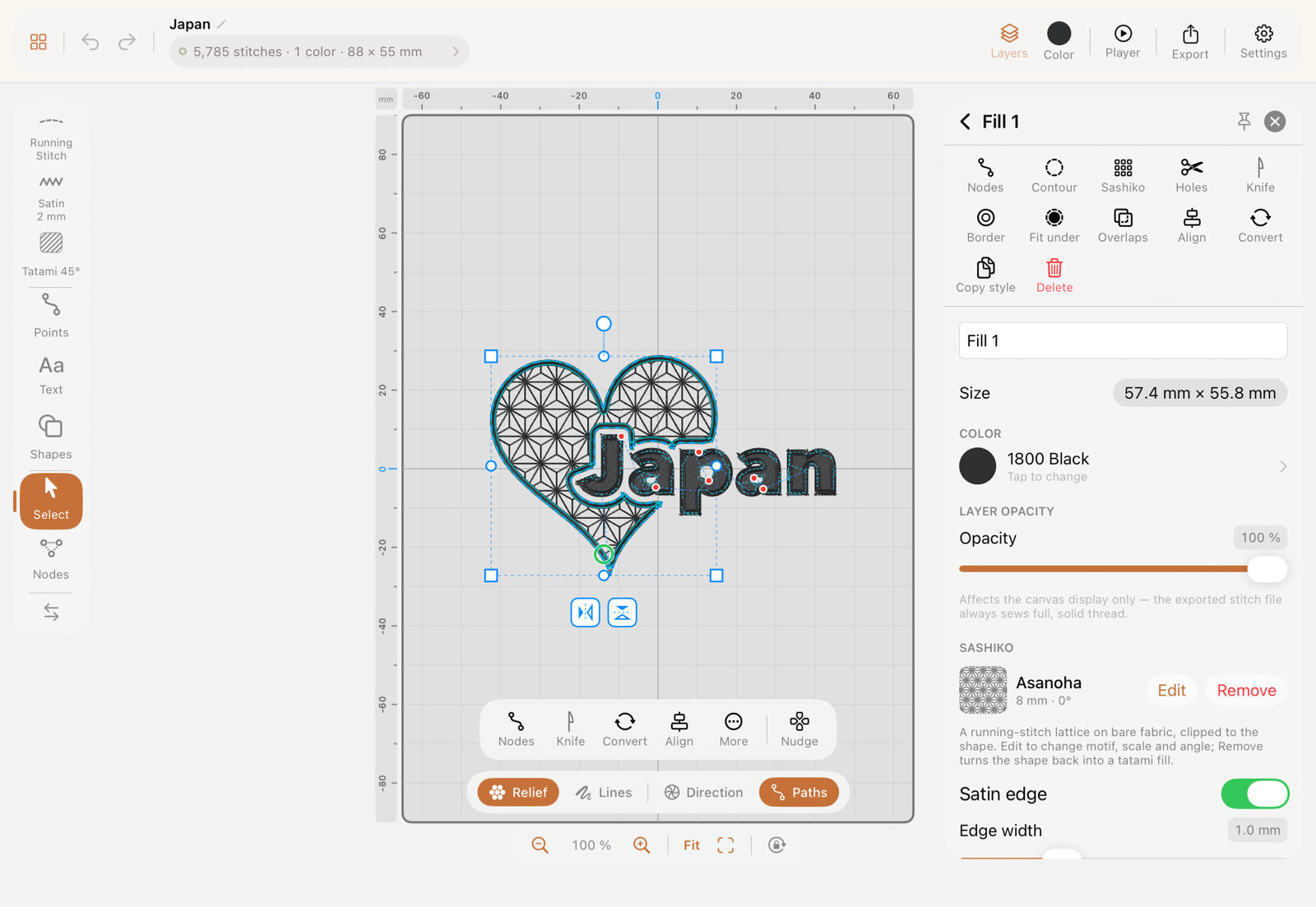
Once applied, a Sashiko fill’s inspector shows a compact summary — motif, scale, angle — plus an Edit button back into the full sheet, sitting right alongside the object’s ordinary Color and Layer opacity fields:
Why isn’t there a gap between dashes, like real Sashiko?
Section titled “Why isn’t there a gap between dashes, like real Sashiko?”A machine can’t leave thread hanging in mid-air the way a hand-sewn dash-gap-dash can — every “gap” would need a trim and a jump, which is slow and looks messy at the machine. StitchPencil instead stitches the whole motif as one continuous running stitch, and lets the lattice geometry itself carry the visual pattern. That’s also why the sheet has a stitch length slider but no gap control.
Where do I turn a shape into Sashiko?
Section titled “Where do I turn a shape into Sashiko?”Select the object and tap Sashiko in its action grid — it opens a dedicated sheet, not the Fill pattern picker (Sashiko is deliberately left out of that picker, since it replaces the whole fill rather than adding a texture option to it).
What can I choose in the Sashiko sheet?
Section titled “What can I choose in the Sashiko sheet?”- Motif — ten tiles in two rows: the straight-lined lattices Asanoha, Uroko, Kikko, Igeta, Sayagata above; the waves Seigaiha, Amime, Shippo and the two directional motifs Yabane and Tatewaku below. Each tile is a live preview rendered from the same engine as the canvas, so what you tap is exactly what you get.
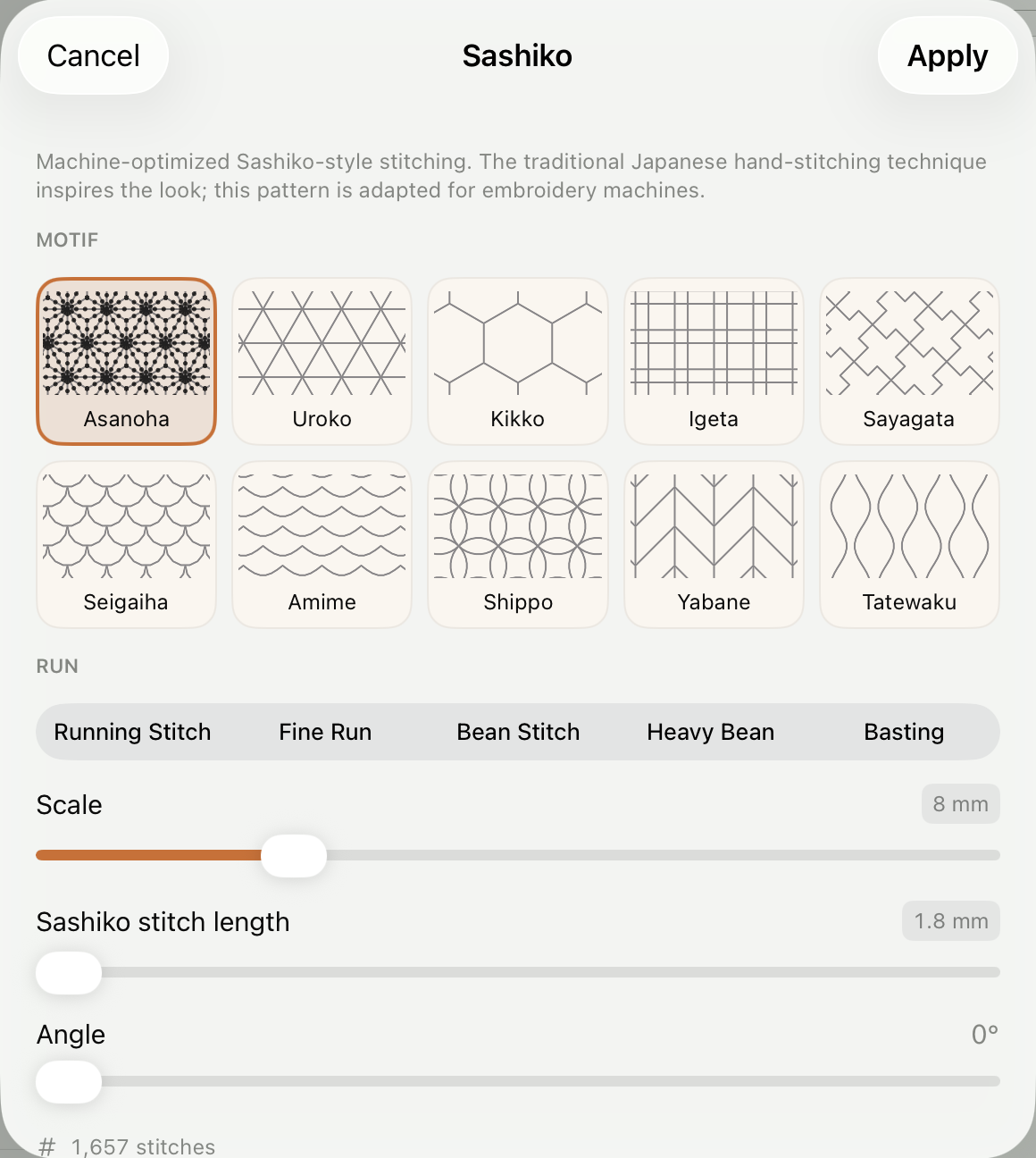
- Run — a picker of your own Run presets (Running Stitch, Fine Run, Bean Stitch, Heavy Bean…); picking one sets the stitch length and pass count together, since Sashiko is traditionally worked in a heavier thread and a bean-style multi-pass is how a machine gets that weight.
- Scale, Stitch length, Angle — sliders, with a live stitch count so you can see the cost of a setting before committing to it.
What are the individual motifs?
Section titled “What are the individual motifs?”- Asanoha (hemp leaf) — the iconic six-point star lattice on a triangular grid. The densest of the set and the most obviously “Sashiko”.
- Seigaiha (blue ocean waves) — rows of overlapping scallops, read as fans of waves.
- Amime (fishing net) — staggered rows of shallow wave scallops, an open, airy net. Much lighter than Seigaiha at the same scale.
- Tatewaku (rising steam) — vertical lines that swell and pinch in mirrored pairs. The one directional motif: the Angle slider turns the steam, so it’s the natural choice when the pattern should follow the shape rather than sit in it.
- Shippo (seven treasures) — interlocking circles whose overlaps carve out petals.
- Kikko (tortoise shell) — the plain hexagonal honeycomb.
- Igeta (well curb) — the woven ”#” of paired parallel lines.
- Uroko (fish scales) — the plain triangular lattice, rows of scales pointing up and down in turn. The grid Asanoha builds its stars on, without the stars: quiet and light.
- Sayagata (linked manji) — the key-fret pattern of silk brocade: 卍 shapes joined arm to arm into an endless maze, worn on the diagonal.
- Yabane (arrow feathers) — vertical shafts with barbs at 45° that mirror from stripe to stripe. Directional like Tatewaku: the Angle slider turns the arrows.
All ten tiles show the same amount of fabric at the same scale, so what looks denser in the picker really is denser on the shape.
Which objects can I apply Sashiko to?
Section titled “Which objects can I apply Sashiko to?”Only a fill, or a closed satin or run. This is a deliberate rule, not a bug: Sashiko needs a closed region to lattice across, and a fill’s outline (or a closed satin/run’s outline) becomes the frame that keeps the pattern clean all the way to the edge. An open satin or run can’t host it directly.
What happens when I put Sashiko on a closed satin ring?
Section titled “What happens when I put Sashiko on a closed satin ring?”The outline stays what it is, and the lattice appears as a second object underneath it — the satin frame sews on top, the grid fills the area the frame encloses. Not the band of the satin itself: the opening inside it. Both rows carry a chain glyph in the layer list, the same mark a joined group gets.
The two behave as one shape from then on. Drag, scale, rotate or flip the frame and the grid comes along; edit a node on the outline — you forgot a corner — and the lattice re-cuts itself to the new shape. You only ever edit the outline, never the grid separately.
Reopening Sashiko on the same outline edits that lattice rather than stacking a second one on top. Remove deletes it and leaves the outline standing.
I have an open satin path — why won’t Sashiko apply?
Section titled “I have an open satin path — why won’t Sashiko apply?”Convert it to a fill first (Convert in the action grid), then apply Sashiko to the resulting fill. That extra step is intentional: an open stroke has no natural “inside” for the lattice to cover, so StitchPencil asks you to make that decision explicit rather than guessing.
Can I give a Sashiko fill a clean stitched edge?
Section titled “Can I give a Sashiko fill a clean stitched edge?”Yes — the same Satin edge toggle available on any Fill object works on a Sashiko fill too, adding a thin same-color satin band along the outline (with its own Edge width slider) so the lattice ends cleanly at the border instead of just stopping. See Fill (Tatami) for the general explanation.
Can I combine Sashiko with a gradient Blend?
Section titled “Can I combine Sashiko with a gradient Blend?”No — Sashiko and Blend are mutually exclusive on the same object, gated both directions in the UI.
Does Sashiko work with Live Text?
Section titled “Does Sashiko work with Live Text?”No, only path-based objects (drawn shapes, converted shapes) — not live, still-editable text.