Points & nodes — Precision digitizing
What is the Points tool for?
Section titled “What is the Points tool for?”Precision, tap-to-place digitizing — instead of drawing a freehand stroke with your finger or Pencil, you place individual nodes one at a time and StitchPencil connects them. It’s the tool of choice when you want exact control over a path, or when you’re tracing something with sharp, deliberate corners.
Can I place round points directly?
Section titled “Can I place round points directly?”Yes, the way a pen tool does it:
- Tap places a corner: the line arrives straight and leaves straight.
- Tap and drag places a round point: as you drag, its grip comes out in the direction you pull, the mirrored grip appears on the other side, and the segment behind you bends to match. Let go, and the next segment leaves along that grip.
- Tap the last point you placed to switch it between corner and round. A corner turned round gets its grip along the way in, a third of the way to the previous point; tap again and it is a corner.
Every point keeps being editable afterwards in the nodes, where you can move the grips, split them into a cusp or make them a pair again.
What’s the “Line vs. Pairs” chip I see for satin?
Section titled “What’s the “Line vs. Pairs” chip I see for satin?”When you’re placing nodes for a Satin object, a small chip in the bottom context bar switches between Line (you place one centerline, and StitchPencil derives both rail edges from it plus a width) and Pairs (you place the two rail edges independently, node by node) — useful when a satin column needs to taper or shift unevenly in a way a single centerline-plus-width can’t express.
With Pairs, the placed points are the edge — that is exactly where the needle goes in. So a column placed this way has its pull compensation at 0. A drawn column gets 0.2 mm per side, because the fabric pulls it narrower as it sews; if you want that on pairs too, raise the slider in the inspector. The width in the inspector is the column’s widest place; the slider scales every pair proportionally, so a taper stays a taper.
How long is the line I am placing?
Section titled “How long is the line I am placing?”While you place points, a small label beside the Pencil says how long the segment from the last point is — in your project’s unit. For a satin along a line it also shows the column’s width; with Pairs it shows the width of the pair while you place the second edge. The label sits on the tool rail’s side of the Pencil, away from your drawing hand, and moves to the other side with the rail.
Does the Pencil do anything special in Points mode?
Section titled “Does the Pencil do anything special in Points mode?”On hover-capable Apple Pencil hardware, hovering near the screen shows a live rubber-band preview of where the next node will land, before you actually tap it down.
How do I get into an object’s nodes?
Section titled “How do I get into an object’s nodes?”Tap Nodes in the tool rail, right under Select. Nodes is not a tool of its own but the way Select answers a tap — as Points belongs to the drawing Stitches — so both buttons are lit.
- Tap an object and its nodes open at once, through a group too.
- Tap another object and you are in its nodes. There is nothing to confirm; every node edit applies immediately.
- Tap the same spot again to dig one layer deeper, as Select does — that is how you reach a small object under a satin or inside a fill. A smaller object right under the finger also gets the tap where it would otherwise have put a node on the edge of the big open object; exactly on that object’s line the tap stays with it.
- Tap empty canvas to put the object down; Nodes stays on.
- Switch Nodes off (or tap Done) and the object stays selected and gets its frame back: the same object, once as a whole, once in its nodes.
A small bar on the canvas goes with it: the open object’s name with Previous and Next through every editable object in sewing order (“12 / 48” — working through an import layer by layer), Corner/Round for the selected nodes (several at once, too: all round become corners, otherwise the corners become round), Split, then Delete and Done. You do not need the layer panel for any of it: it does not open by itself in this mode, and closing it does not end the node editing. The slower controls — smoothing, the width at a node, simplify, reverse direction — remain in the inspector.
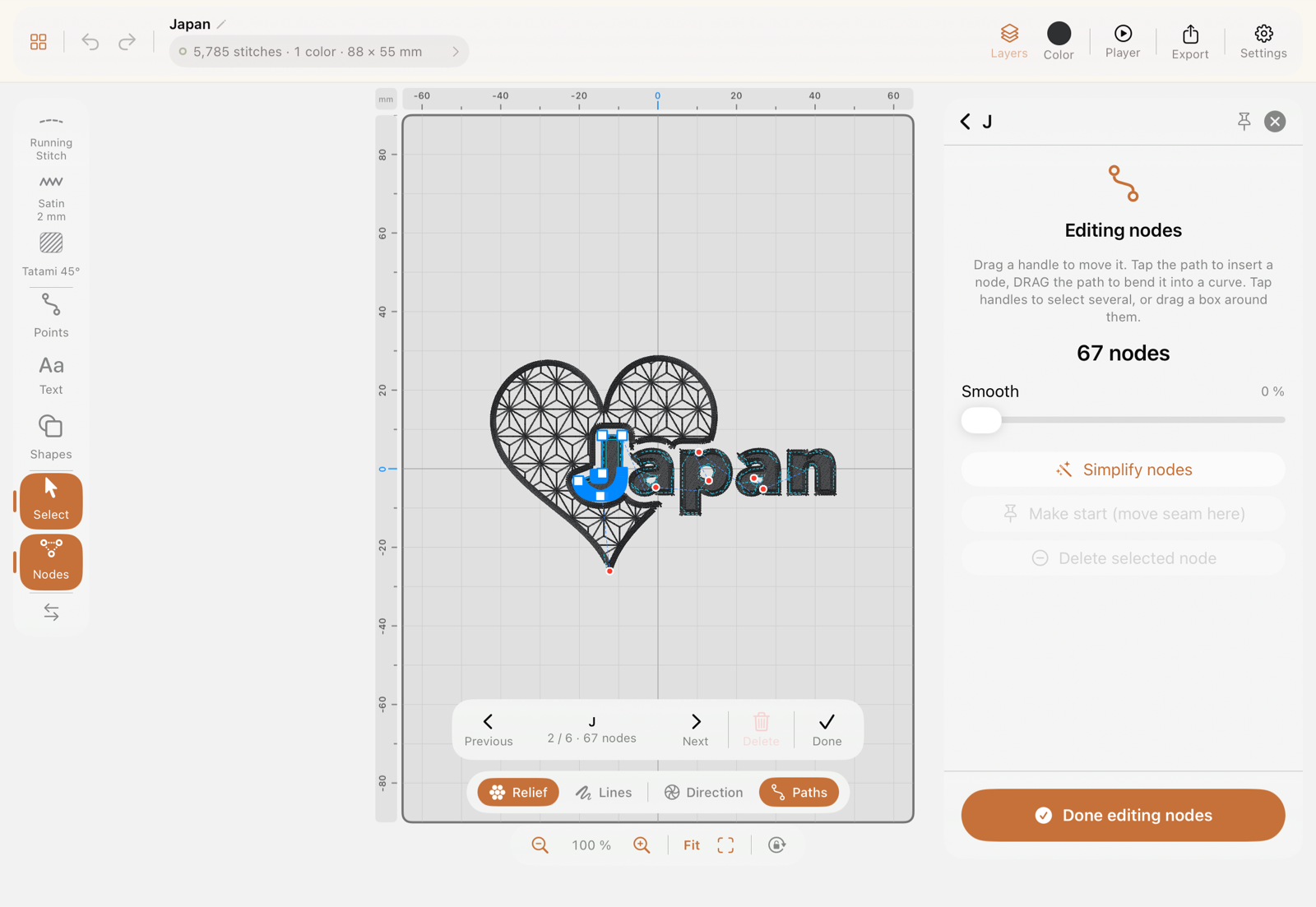
The Nodes tile in the selection bar and in the inspector is still there; it switches the same mode on with the selected object already open. Live text and locked layers open no nodes and say why. A design never opens with Nodes on, so a tap meant to move something does not land in its nodes; after switching to drawing and back it is still on.
An object made with the Points tool opens with exactly the points you placed, however many: every point is a node, and a bent segment gets its handles.
How do I edit an existing path’s nodes?
Section titled “How do I edit an existing path’s nodes?”Once a path is focused for node editing:
- Drag a handle to move a node
- Drag along a segment between two nodes to bend it into a curve
- Drag a tangent grip (the small circle beside a curved node) to change how the line leaves the node. A corner node you have selected shows two faint grips where its handles would lie: pull one, and the node becomes round with the other grip following — no need to press Round first. A grip never reaches past the neighbouring node: any longer and the line would overshoot it and fold back into a spike. On a round node both grips move as a pair; Split handles makes it a cusp — the node keeps both grips, but each goes its own way, a corner with a curve on either side. Make smooth pairs them again
- Tap a segment to insert a new node there
- Double-tap a node to delete it
- Drag the orange grip next to a selected node to change how WIDE the column is at that spot
Corner, round or cusp — what is the difference?
Section titled “Corner, round or cusp — what is the difference?”A node can be passed in three ways, and the buttons in the node bar switch between them:
- Corner — no grips. The line arrives straight and leaves straight; the node is a kink. Every point you place with a plain tap of the Points tool is one; tap and drag, and the point is round.
- Round — two grips that form a pair. Drag one and the other turns with it, so the curve runs smoothly through the node. Right for anything round: an arc, a wave, a bulge. The first and last node of an open line have one grip only — into the line, as in Affinity or Inkscape; there the curve simply follows your finger.
- Cusp (via Split) — two grips that no longer know of each other. Each points its own way, so a curve arrives on both sides and they meet in a kink: the tip of a petal, the notch at the top of a heart, the bottom of a drop. Before, that took “Corner” — and then both sides were straight.
To get a cusp: tap the node, Round, then Split. Nothing changes at first — but from now on dragging one grip leaves the other where it is. Make smooth pairs the grips again, Corner removes them. On a satin column the difference shows in the stitching too: a cusp gets a proper mitre, a round node would have ironed it away.
This works for several nodes at once: pick a stretch (tap the first node, arm the stretch, tap the last) — if all are round, the button makes them all corners; if even one is a corner, all become round. Split works on all of them the same way.
How do I lean the stitches of a satin column?
Section titled “How do I lean the stitches of a satin column?”Normally the stitches of a satin column run square to the centreline. With the purple grip on a node you lean them — the stitch angle other programs offer. Select a node of the column and the purple grip appears beside the orange width grip, on a dashed leader; turn it and the stitches there follow. The lean fades out towards the neighbouring nodes: one leaned node in the middle gives a soft transition, two leaned nodes in a row one continuous slant between them. What it is for: stitches that run evenly through a curve; a petal whose stitches fan from the base to the tip; an end that should finish on a slant.
Two things stay as they are: at a real kink the corner keeps making its mitre, and the grip there does not change that. And at 70° the grip stops — beyond that the stitches would lie almost along the column, which is not a lean but a break. The column’s width stays what you set; only the stitches go slanted, and so a little longer.
How do I fix one spot that came out too wide?
Section titled “How do I fix one spot that came out too wide?”A stroke drawn with Pencil pressure carries its width along its length — thin where you were light, thick where you pressed. That is usually the point. But when the line itself sits perfectly and one place came out too thick, the object’s Width slider is the wrong tool: it moves all of it.
Select the node at that place — or tap the path to insert one exactly there, which places it with the width it already has — and drag the orange grip that appears beside it. It sits at half the column’s local width, with a smaller twin on the far side: the change is symmetric, so the centreline you tuned stays exactly where it is.
The change eases back to what it was on either side, so what you get is a swell or a taper rather than a dent. Below 1 mm the cover reads as a line rather than a column, and 20 mm is as wide as a column goes — the grip stops at both. (Past roughly 10 mm the column is sewn as a staggered split rather than one very wide throw, so it stays stitchable; see Satin.)
Blue grips move the line, orange grips change its width. And the object-wide Width slider still works on a column you have shaped locally: it scales the whole profile, so the thinnest place lands on the slider’s value and everything you shaped keeps its proportions.
A letter I drew came out angular. Can I round it afterwards?
Section titled “A letter I drew came out angular. Can I round it afterwards?”Yes — that’s what Smooth is for. Open the object for node editing and you’ll find a Smooth slider in the inspector, from 0 % (leave it exactly as drawn) to 100 %.
What it does is lay a curve through the nodes you already have. It does not move them, does not add or remove any, and does not redraw the shape: the path still passes through every node, it just arrives and leaves in a curve instead of a kink. So the outline you positioned stays where you positioned it, and a stroke that came out as a chain of short straight segments reads as one continuous bend.
Corners survive. A sharp turn is treated as a deliberate corner — the tip of a V, the inside of an L — and stays sharp no matter how far you push the slider. Smoothing rounds the wobble, not the design.
Drag the slider and the stitches follow live, so you can stop at the point where it looks right rather than guessing a number. One drag is one undo step.
On an O or any closed ring it works the same way, all the way around the loop, including across the point where the ring closes — there is no seam at the start node.
On a satin column the two rails follow the smoothed centreline together, so the column keeps the width you gave it at every node. And on a puff section, smoothing the columns also moves the placement outline and the tack run with them — they are derived from the same shape.
Smooth lives in the node editor and works on one object at a time, deliberately: it is a shape edit, and shapes are edited per object.
Can I smooth just one part of a line?
Section titled “Can I smooth just one part of a line?”Yes. Tap the node where the piece should start, then Stretch to …, then the node where it should end. The piece between them is highlighted on the canvas, the slider is now called Smooth the stretch, and only that piece moves.
This is the tool for the end of a stroke that swung out when you lifted the pencil, and for a single loop in a cursive letter. Everything outside the stretch stays exactly where it is, and the strength runs out towards the two ends of the stretch, so the joints do not become kinks. At the free end of an open path there is nothing beyond it to protect — pick a stretch that contains the tip and the tip is ironed into the line, which is the point of it.
On a ring there are two ways round between two nodes. The shorter one is taken, and Other side flips to the other. Clear drops the stretch and the slider is back to the whole object.
How do I round the corners of a rectangle?
Section titled “How do I round the corners of a rectangle?”Not with Make smooth: on a four-node rectangle that bends the whole side into an arc, because a smooth node’s tangents reach to the neighbouring nodes. What a puncher does by hand — a node either side of the corner, the corner itself deleted — is what the Round corners slider in the node editor does for you. Drag it and every corner between two straight pieces becomes an arc of that radius, live; select some nodes first and only those corners round. The slider always works from the shape as you found it, so 0 brings the corners back, and one drag is one undo step.
Limits: the radius stops at half the shorter side, so two corners on a short side never cross. On a satin column the inside edge is the radius minus half the width — below that the inside stays sharp, and the curve check says so when the rungs crowd. Corners whose legs are already curves are left alone, as are gentle bends under 30°.
What controls only show up while a node is focused?
Section titled “What controls only show up while a node is focused?”Make start (choose which node the machine begins stitching from), Make smooth / Make corner (toggle a node between a curved and an angular join), Reverse direction, and Simplify nodes (reduce an over-dense path to fewer control points). These live only in the focused node-editing inspector state — you won’t find them anywhere else.
What does Simplify nodes actually change?
Section titled “What does Simplify nodes actually change?”Only the number of nodes, never the shape. Every candidate it considers is built exactly the way the column will be built, then measured against the edges the object already has: it is only accepted if no edge moves more than 0.35 mm and no stitch turns more than 12°. A hand-set column of 107 nodes on a straight run collapses to a handful; the mitred end that gives the shape its corner keeps its node, because dropping it would move the edge.
If nothing can go without changing the shape, nothing goes, and a message says so rather than leaving you to wonder whether the button worked.
What are the coloured grips on a selected node?
Section titled “What are the coloured grips on a selected node?”- Blue — the node itself. Drag to move it.
- Orange — the column’s width at that node, one on each side. They move together, so the node stays on the centre.
- Purple, on a dashed leader — the angle of the stitches at that node, on every node of an open column. At an end, dragging re-aims the finish, say an end the Knife cut on a slant; the rest of the column does not move. At a node in between you lean the stitches there: the lean fades out towards the neighbouring nodes, and two leaned nodes in a row give one continuous lean between them. At a bend the mitre stays what the corner makes it.
A satin made from a line — one width for the whole column, as the Points tool’s Line mode makes it — carries neither a width per node nor an angle. The first pull at an orange or purple grip rebuilds it as a column with two rails, which carries both; a message says so, and Undo brings the line back. Moving nodes alone leaves it a line.
A green ring marks the first stitch and a red one the last — those are markers, not grips.